Beyond Dubsado: Smart Tools and Integrations for Business Efficiency
Running a small business means juggling clients, content, and constant communication. The right CRM software and automation tools for small business owners don’t just help you stay organized—they give you back your time. In our recent webinar, Certified Dubsado Specialist and systems strategist Jeslyn Shenkin shared how she builds a connected, automated business using her favorite tools beyond Dubsado—including Flodesk, Notion, and Zapier.
Whether you’re looking to optimize your client onboarding, automate email marketing, or streamline project management, this walkthrough will show you how to connect your systems and save hours every week.
Why integrate other tools with Dubsado?
Dubsado can automate so much—from onboarding to invoicing to ongoing communication—but that doesn’t mean it has to be your only software. Jeslyn explained how integrating complementary tools like Notion, Flodesk, and Zapier can help fill in the gaps and create an even more powerful client experience.
“You probably started your business for more freedom,” Jeslyn shared. “So if your business is running you into the ground, it’s time to let automation do some of the heavy lifting.”
Meet the tools
Here’s a quick look at the key players in Jeslyn’s setup:
Dubsado – the hub for all things client-related: lead forms, proposals, contracts, invoicing, 1:1 client communication, and workflows.
Flodesk – for nurturing leads and clients with beautifully designed email 1:many marketing sequences and newsletters.
Notion – Jeslyn’s “external brain,” where she tracks project info, tasks, goals, and content.
Zapier – the glue that connects these platforms and automates cross-tool actions (no coding required!).
The smart workflow Jeslyn built (and how you can replicate it)
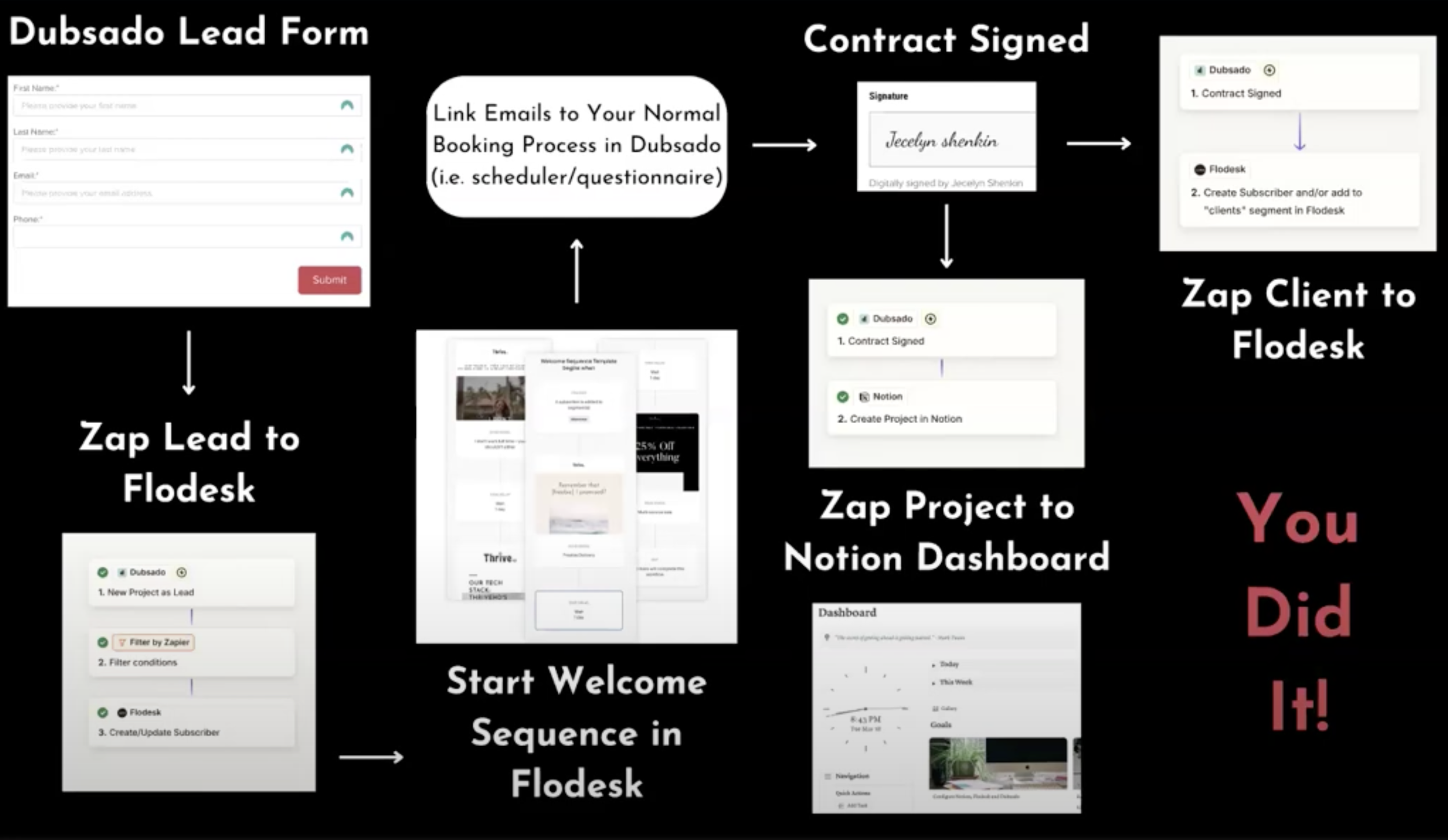
Jeslyn walked attendees through an example automation that connects all four tools. Here’s what it looks like:
Start with a Dubsado lead form
Most users already have this on their website or Instagram. When someone fills it out, they’re automatically added as a new lead in Dubsado.
Zap the lead to Flodesk
Using Zapier with the Dubsado integration, the new lead is added to a Flodesk segment and kicked off into a welcome email sequence—no manual entry needed.
💡 Don’t forget to include a marketing consent disclaimer on your lead form if you plan to email them!
Deliver your freebie or welcome sequence
This part happens in Flodesk. Jeslyn showed how to set up a short series of emails to introduce your brand and offer something valuable—like a free resource or a booking link.
Let Dubsado take over when they book
If a lead books through your Flodesk email link, Dubsado will trigger its own workflow to handle contracts, invoices, and more.
Update Flodesk segment once they become a client
Once a contract is signed, a new zap can move them to a “Client” segment in Flodesk, so they stop receiving sales emails and start getting updates meant for active clients.
Send project data to Notion
Using another zap, Dubsado sends client info to a Notion dashboard Jeslyn built specifically for project tracking. This eliminates the need to retype or copy over client info manually.
Why this works (and how it saves time)
By automating lead nurturing, client onboarding, and internal tracking across different platforms, Jeslyn’s system saves her hours of admin work each week—and helps prevent leads from slipping through the cracks.
“I don’t have a team,” Jeslyn said. “But I do have an army of robots handling things behind the scenes.”
Even if you only implement one part of this automation—like sending new leads to Flodesk for nurture—you’ll feel the time savings.
Want to try it yourself?
Jeslyn generously shared free templates for Flodesk workflows, Zapier automations, and a ready-to-use Notion dashboard. You can grab everything at:
👉 thrivehd.com/dubsado-webinar
Final thoughts
This webinar reminded us that Dubsado doesn’t have to be an isolated tool—it can be the heart of your business, connected to an ecosystem of smart software.
Whether you’re just starting with automations or ready to create a full workflow like Jeslyn’s, remember: small steps add up. Choose one piece of the system and build from there.
And if you’re not sure where to start? Our community of Certified Dubsado Specialists or free Facebook Community is here to help.
Watch the full replay here:
About Jecelyn
Jecelyn Shenkin is a Dubsado Certified Specialist and is a business and marketing strategist with a passion for helping business owners quickly reach their goals, jump revenue brackets, and scale. She’s ready to get you and your business unstuck. She loves music, travel and photography, and she is constantly learning something new.